
6+ Best Online Community Platforms for You (Tested in 2026)
 Nahin SultanaJun 29, 202612 min read
%20(2).png&w=3840&q=75)
Building an online community is exciting until you realize how hard it is to keep people engaged.
Scattered conversations, low participation, and zero retention can quickly kill momentum.
But when done right, a community becomes your most powerful growth engine. Well, it drives engagement, loyalty, and recurring revenue.
The problem? Choosing the right platform.
In this guide, I’ll break down the eight best online community platforms in 2026 so you can find the one that helps.
Note: I collected the platforms by doing some research and asking users to find the best online community paltforms in 2026. And, the prices are subject to change so I’ll update them!
TL;DR (Best online community platforms)
An online community platform is a digital landscape where you’ll find feeds, spaces, marketplaces, events, chat, and other options to connect with others.
The best online community platforms are Circle, Skool, Mighty Networks, EzyCommunity, Discord, Bettermode, Slack, & BuddyBoss.
Based on Global Market Statistics, the online community platforms are projected to make $119,597.8 million by 2035.
What is an online community platform?
An online community platform is a digital space where you can connect, interact, and build relationships.
It also brings everything into one place. Plus, you get discussions, content, events, and communication so users can engage easily.
With this, you let others get the chance to share posts, chats, live sessions, and more.
Beyond interaction, it gives creators and businesses control over their audience. In fact, you’ll find tools for engagement, customization, and monetization.
How to select the best online community platforms?
A true online community platform is a place where people talk, connect, attend events, and keep coming back. So, you should select a platform that helps you build, manage, and grow a real community.
Communication tools
It’s ideal to pick one platform that lets you have a chat option along with call, texting, and video chatting features.
Live interaction tools
Be sure your chosen online community platform has live sessions, webinars, and streaming options. These are some of the basic aspects that a user would need. So, focus on that!
Content feed
A feed allows members to post updates, ask questions, and share ideas. Plus, this keeps the community active every day. So, look for one that has a feed or newsfeed.
Engagement tools
It would be great to have a community platform that has engagement tools. Just make sure to pick one that lets you add polls, reactions, and comments.
Events & community activities
A strong community lets its users host workshops, meetups, or online sessions with events. Plus, members can join, get reminders, and stay connected.
Membership & monetization
Pick a platform that lets you create memberships, paid access, or different user levels. Plus, it would be better to use a platform that has options to monetize your content in diverse ways.
Builder & flexibility
It’s better to use a community platform that lets you use builders to create content or simply customize. Many platforms now include builders or design tools.
These also help you create pages, organize sections, and control how everything looks without coding. So, choose wisely!
Groups & spaces
Single out a platform that has an option to add groups or spaces for our member’s convenience. These also help you organize topics, interests, or member types.
Notifications & activity tracking
A good platform sends updates when something important happens, like new posts, replies, or events. This keeps your community active without you needing to remind people manually.
Analytics & reporting
You cannot grow your community platform without analytics and reporting tools. So, go with one that has these tools to track & improve your performance.
Quick summary of the 8 best online community platforms
1. Circle: Best for creating interactive communities for events, discussion, and branding control.
2. Skool: Best for building high-engagement communities with an easy interface and built-in courses.
3. Mighty Networks: Best for strong community engagement with courses, live streams, and membership.
4. EzyCommunity: Best for building professional, organized communities with courses and monetization.
5. Discord: Best for creating large communities with real-time voice, text, and live video.
6. Bettermode: Best for creating vibrant communities with AI-powered moderation and extensive engagement tools.
7. Slack: Best for having professional communication communities with massive tools and functionality.
8. BuddyBoss: Best for building WordPress-based communities with broad-style forum discussion and video conferencing.
Comparison table of the best online community platforms

6+ best online community platforms compared
1. Circle

If you want to build an online community under your own brand, Circle is for you. It also lets you personalize your feed and apply your own logo, colors, and brand theme.
Apart from that, you can create different spaces for discussion, live events, and courses. Plus, you won’t need third-party tools.
The platform also has automated moderation, unlimited history search, and rich media posts.
In addition, you’ll find a branded mobile app option for free with the Circle Plus plan. But, it costs more than most platforms.
To coach your community, you can also build your own personalized AI agents. There are hardly any Circle alternative platforms that give you AI agents as of now.
You can also attach your courses, events, and posts to the emails and send them directly to the community members.
With built-in analytics, it’s difficult to argue against Circle being the best online community platform. And, it has a 3.9 out of 5 stars rating on Trustpilot.
Features
Build, grow, and manage with its community features.
Find a personalized feed and engagement tools.
Includes AI tools to handle content and responses.
Get built-in monetization options.
Benefits
Gamification and marketing.
Flexible monetization tools.
Excellent member segmentation.
Automation and analytics.
Effortless member management.
Drawbacks
Takes a 2% transaction fee on the Professional plan.
Pricing plans

1. Professional: $89/month (yearly)
2. Business: $199/month (yearly)
3. Circle Plus: Personalized plan ($30k/year)
2. Skool
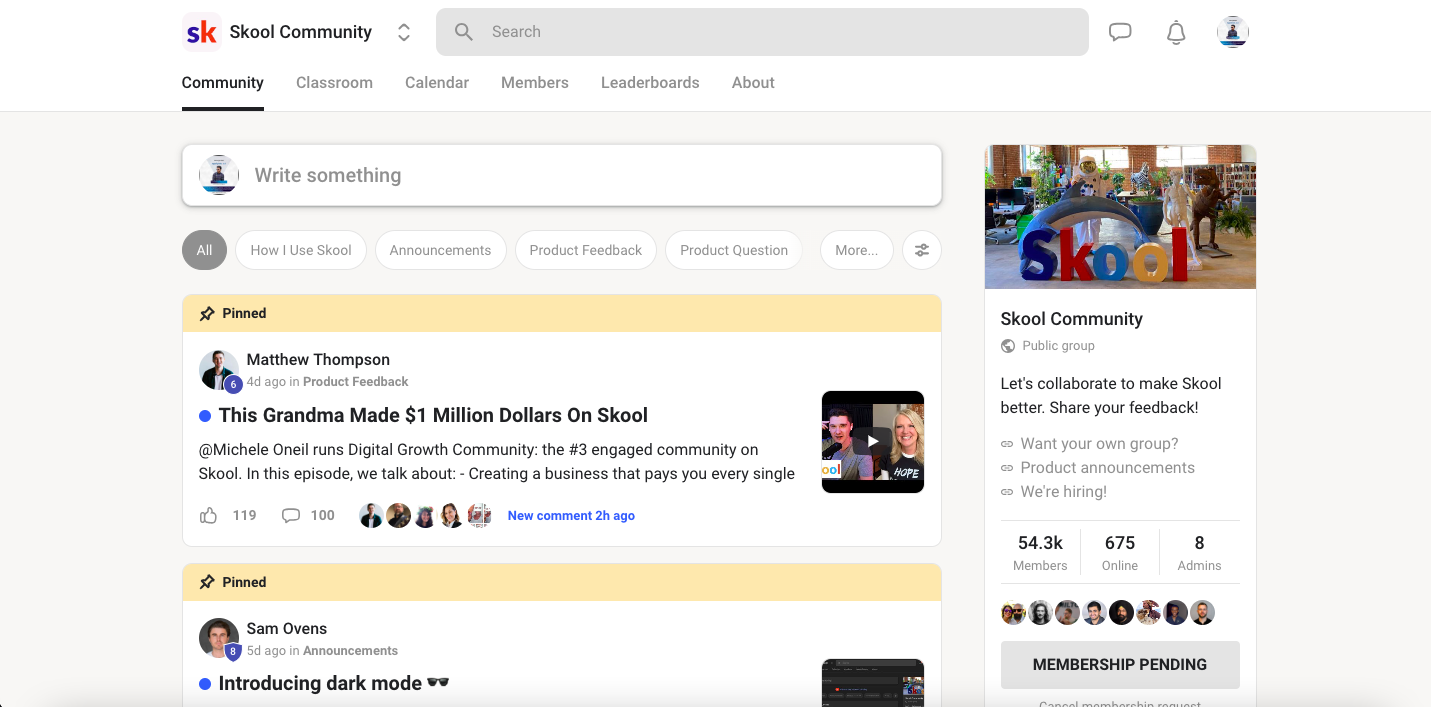
In 2026, it’s safe to choose Skool, one of the fastest-growing community platforms, to build an interactive online community.
The clean, distraction-free interface streamlines posts, comments, notifications, mentions, videos, photos, and real-time interaction.
Need more direct interactions? It allows you to schedule your group events and livestreams with ease.
In addition, the platform enables you to put your courses in the same place as your community. Putting together pages, resources, searchable transcripts, and other forms of resources seems easier with it.
One feature many find helpful, and that other Skool alternatives miss, is the real-time search. However, it has pretty bad reviews on Trustpilot with a 1.7-star rating out of 5 stars.
If you are looking for a platform with the best community management tools, then Skool offers progress tracking, growth, and engagement on a single dashboard.
Features
Earn by combining courses and community in one place.
Easy to use with chat, posts, and notifications.
Find gamification options like points and rewards.
Get a real-time search section to find content, groups, and members.
Benefits
Modern & clean user interface.
Auto-affiliate program.
Highly flexible and scalable.
Creator-focused ecosystem.
Easy learning course.
Drawbacks
Takes a 2.9% or 10% transaction fee based on its plan.
Pricing plans

1. Hobby: $9/month + 10% fees
2. Pro: $99/month + 2.9% fees
3. Mighty Networks

Mighty Networks is one of the best community sites. Plus, highly engaging and effortless interaction is at its core.
It also offers monetization tools, courses, and memberships to help you build a sustainable business.
In fact, it stands out from the competition due to its capability to manage membership with weekly events, monthly themes, and daily questions.
Plus, another great aspect of the tool is the native mobile apps, which encourage participation and more user interaction.
No doubt that Mighty Networks is one of the best community engagement platforms for creators.
But, it costs a lot for basic features, as you’ll need to spend $17k for the Mighty Pro plan.
Apart from that, the platform also includes an AI builder that helps to instantly generate course outlines, landing pages, and member profiles.
Features
Build interactive & animated communities.
Run cohort + self-paced courses easily.
Get chat, feed, events, and directory.
Host private sub-communities for particular members.
Benefits
Effective membership access control.
Centralized content delivery option.
Native event management system.
Searchable member directory.
Course creation tools and analytics.
Drawbacks
Charges $17k/year to get a branded mobile app.
Pricing plans

1. Launch Plan: $79/month (yearly) + 2% fees
2. Scale Plan: $179/month (yearly) + 1% fees
3. Growth Plan: $354/month (yearly) + 0.5% fees
4. Mighty Pro: Personalized plan + 0.5% fees
4. EzyCommunity

EzyCommunity is a rising online community platform that lets you build spaces, run memberships, and add private groups.
With this, you’ll find a feed, courses, a library, a leaderboard, members, and so on. Thanks to its Elite plan, you can get unlimited members, courses, and published products with no transaction fees.
Plus, it has 30TB of storage with a free branded mobile app and live streaming options. This also includes membership with group/private chat options.
You’ll also get 2 admin seats to control your platform and 24/7 priority support to solve issues.
With a SaaS plan, you’re not just running one branded community. Instead, you’re literally selling branded communities just like Circle or other platforms you’re reading about here.
Features
Free branded mobile app + 0% transaction fees.
All-time priority support.
Dedicated community builder and tools.
Multichannel posts + topic spaces.
Benefits
Built-in monetization tools.
Perfect for setting up events.
Upload courses and lessons.
Rich and flexible editor.
Beginner-friendly interface.
Drawbacks
Only 10 courses in its Pro plan.
Pricing plans

1. Pro: $87/month (yearly)
2. Business: $197/month (yearly)
3. SaaS Partner: $399/month for a year (then $599/month)
5. Discord

Discord is a high-end community application widely used for real-time voice, video, and text chat. Especially among gamers, it has become an inevitable tool to talk, play, and hang out.
You can also build a worldwide community by customizing your own spaces. Plus, it has a live streaming option. Without having to call or invite anyone, you can start voice calls and text messaging.
During intense gaming sessions, you can notice what modes or characters your friends are playing. Its built-in games and music also put it in high demand.
To manage multiple group chats with your friends, it supports the utilization of additional tools.
Plus, you can write your own profile in the chat. Besides, it allows you to create invite-only, private spaces for your community.
In a dedicated space, you can collaborate, enjoy, and connect with your friends to have meaningful conversations.
Features
Find text, voice, and video chat options.
Add a custom onboarding setup.
Include topic-based channels.
Contain live events, stage channels, and threaded conversations.
Benefits
Low-latency streaming.
Forum channels.
Server monetization.
Server templates.
Custom status setup.
Drawbacks
No real community, course, or site tools included.
Pricing plans

1. Nitro Basic: $2.99/month
2. Nitro: $9.99/month
6. Bettermode

Bettermode is another of the best community platforms, perfect for businesses, SaaS companies, and brands. It’s highly renowned for its unmatched branding control and enterprise-level security.
You can also customize your community and redesign the overall layout. Plus, it gives you community moderation tools so that your users can use them. Its built-in AI-powered moderation is also commendable.
Coming to the engagement tools, it has everything such as mentions, emoji reactions, rich text, and pictures. In fact, you can let members in the group engage with each other’s posts with Bettermode.
With contextual and personalized content, its activity feed makes it easy to keep members hooked all along.
The private messaging, leaderboards, and fully automated smart badges also make it the best platform to build online community. Plus, you can add new functionality to the community with the apps.
Features
Organize members or content with spaces, collections, and tags.
Design pages, navigation, profile, and domain.
Find third-party tool integrations.
Includes content tools to make better posts.
Benefits
Ability to host the community in multiple languages.
Seamless member sorting and filtering options.
Ready-to-use blocks for creating community.
Gamification via leaderboards.
Rich profile fields and customization.
Drawbacks
Limit on community tools and members.
Pricing plans

1. Starter: $399/month (yearly)
2. Growth: $1,500/month (yearly)
3. Premium: Personalized plan
7. Slack
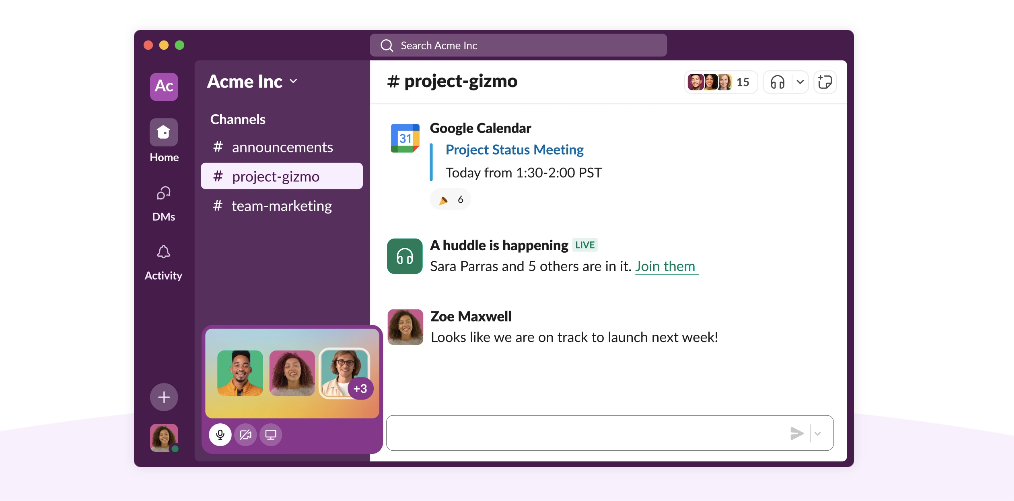
Slack is used as both a community platform and a team communication tool. It’s also hard to think of an alternative to Slack, thanks to its real-time messaging, channels, groups, file sharing, and notifications features.
Plus, it allows you to create as many channels as you need for transparent conversations for your teams and projects.
In addition to that, it encompasses the canvas, lists, templates, and so on. You can also connect Slack with other requisite applications to streamline your workflow.
Besides, Slack AI has brought about a new dimension to the overall usability and scalability. To analyze your user’s data and provide strong member communication, you can simply ask an AI agent.
It’s one of the best free online community platforms, as it costs nothing when you don’t need the Pro plans.
Features
Find a channel-based organization.
Includes AI agents and Slack Connect.
Record and share messages with clips & updates.
Use project tools like templates, lists, and files.
Benefits
Easy to set up and use.
Uninterrupted communication.
Extensive tools and functionality.
Optimal flexibility and security.
Perfect for all kinds of businesses.
Drawbacks
The free plan is pretty limited and contains no AI tools.
Pricing plans

1. Pro: $7.25/month (yearly)
2. Business+: $15/month (yearly)
3. Enterprise+: Personalized plan
8. BuddyBoss

When it comes to building an online community with holistic features, BuddyBoss always comes into consideration.
Plus, this WordPress-based community platform offers a wide variety of special benefits like private messaging, group messaging, network search, activity feed, user content management, and so on.
It also gives branded and customized emails, albums, and media, and sitewide document features to make the community more engaged.
With the fully editable profile fields, you can customize your community and allow members to share their details.
In a structured format, you can allow members to communicate with each other by creating a discussion forum. Plus, BuddyBoss has vibrant Zoom meetings.
Similar to other popular online community building websites, it has the convenience of offering badges, points, ranks, rewards, and certificates to members.
Features
Gives members a quick view of activity, updates, and interactions.
Find a dedicated mobile app.
Supports themes, page builders, and custom design elements.
Make paid or free member access with memberships.
Benefits
Bulletin board-style forum discussion.
Scheduled video conferencing.
GamiPress integration.
Mobile app support.
Custom design and branding.
Drawbacks
Includes a 2.9% of trasnaction fees on the Start plan.
Pricing plans

1. Start: $99/year
2. Launch: $199/year
3. Bundle: $349/year
Final Words
Once you’re determined to build a community online, secure the right platform first.
And yes, you’ll come across a bunch of options out there that might fulfill a few needs. So, I would suggest that you list down all the vital features that you can’t ignore in a platform and then select one.
In my opinion, go for Circle or Skool if you want to build a community with a good-quality interface. Mighty Networks is also a good choice (but costs more in the long run).
Otherwise, you can try EzyCommunity, which offers better features like unlimited products, members, memberships, live sessions, and a free branded app.
Hope you like this guide to learn about the best online community platforms for 2026 and are able to make a choice. See you in the next guide with a new topic soon!
Build your community on a platform you own
Launch under your brand — you keep the members and the revenue.
Start free Booked by founders & agencies every week